

TL;DR:
- Converting event feedback into actionable marketing improvements is often overlooked, risking ROI loss.
- Successful feedback integration requires the right tools, process steps, clear ownership, and continuous iteration.
- Ongoing refinement of feedback processes drives better pipeline, higher attendee satisfaction, and measurable growth.
Collecting event feedback feels straightforward. You send out a survey, gather responses, and move on to the next event. But converting that raw data into real marketing improvements and measurable revenue? That's where most teams hit a wall. The gap between capturing feedback and actually acting on it costs businesses pipeline, repeat attendance, and competitive advantage. This guide walks you through the tools, steps, common mistakes, and verification methods you need to turn event feedback into a genuine growth engine for your marketing program. 🎯
Table of Contents
- Why event feedback integration matters for your ROI
- Tools and requirements for successful feedback integration
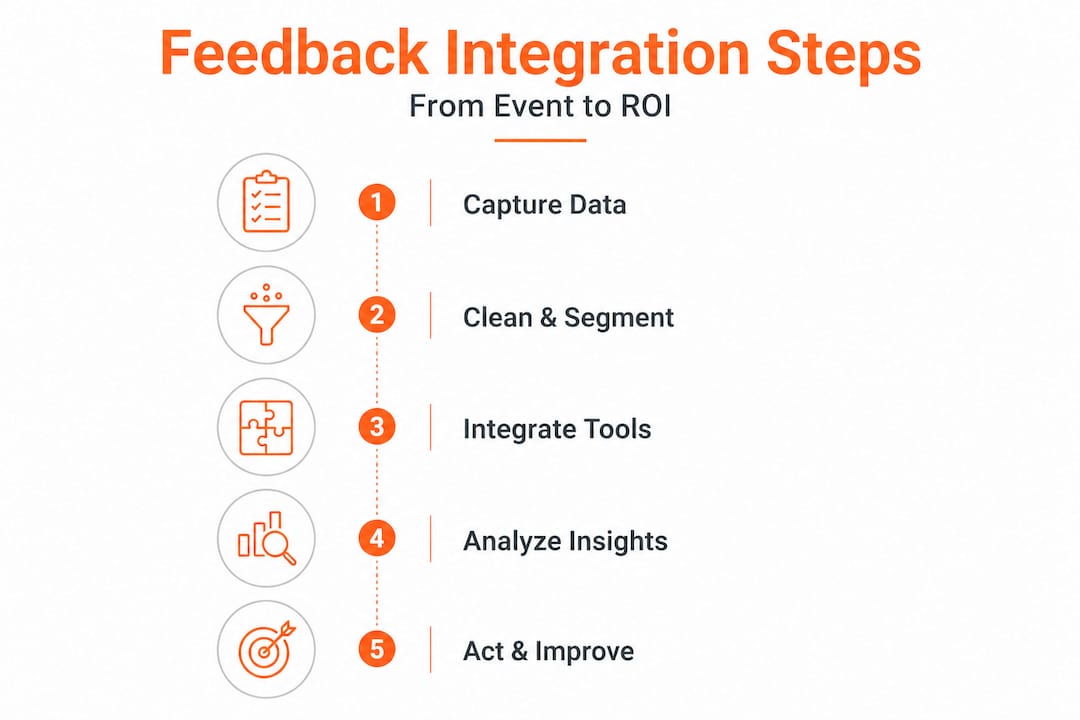
- Step-by-step event feedback integration process
- Avoiding common mistakes and troubleshooting your process
- Verifying results and scaling for future events
- The overlooked reality: integration is not a one-time fix
- Advance your event marketing with Sandbox-GTM
- Frequently asked questions
Key Takeaways
| Point | Details |
|---|---|
| Integration drives ROI | Systematic feedback integration directly increases event impact and revenue. |
| Right tools, right team | Using specialized platforms and assigning clear roles is critical for seamless integration. |
| Automate for scale | Automation enables scaling event feedback processes efficiently with less error. |
| Review and refine | Constantly reviewing and updating your integration process ensures continuous improvement. |
Why event feedback integration matters for your ROI
Most event teams treat feedback as a post-event formality rather than a strategic asset. They collect it, glance at it, and file it away. That approach quietly erodes ROI in ways that are hard to see until it's too late.
When you don't integrate feedback into your marketing workflows, you repeat the same mistakes across events. You follow up with the wrong leads. You invest in content formats that attendees don't value. You miss signals from high-intent prospects who were ready to buy but never received a relevant follow-up. Each of these gaps has a direct cost.
Here's what poor feedback integration typically costs your team:
- Wasted follow-up spend on leads that showed no real interest
- Missed pipeline opportunities from engaged attendees who weren't properly segmented
- Lower event retention rates because attendee experience issues go unresolved
- Misaligned content strategy that doesn't reflect what your audience actually wants
- Reduced sponsor and partner confidence when you can't show measurable outcomes
On the flip side, feedback-driven event strategies lead to measurable marketing improvements across the board. Teams that integrate feedback consistently report better lead quality, stronger follow-up conversion rates, and higher attendee satisfaction scores at subsequent events. The marketing automation impact is especially significant when feedback loops are built into your automated workflows rather than handled manually after the fact.
"The teams winning with events aren't the ones collecting the most feedback. They're the ones acting on it fastest and most precisely."
Pro Tip: Focus your feedback efforts on items you can actually change. Asking about things you have no control over creates noise in your data and frustrates attendees. Keep your feedback forms tightly scoped to decisions your team will make for the next event.
Tools and requirements for successful feedback integration
Understanding the benefits is one thing. Building the infrastructure to capture and use feedback effectively is another. The right tools and clear team responsibilities make the difference between feedback that sits in a spreadsheet and feedback that drives pipeline.
Here's a practical overview of the core components you'll need:
| Tool category | Common platforms | Data source | Who owns it |
|---|---|---|---|
| Survey and feedback collection | Typeform, SurveyMonkey, Slido | Post-event surveys, live polls | Event manager |
| CRM and contact management | Salesforce, HubSpot | Attendee records, engagement history | Marketing ops |
| Marketing automation | Marketo, Pardot, ActiveCampaign | Email engagement, lead scoring | Marketing ops |
| Event management platform | Cvent, Bizzabo, Hopin | Registration, session attendance | Event manager |
| Analytics and reporting | Looker, Tableau, Google Data Studio | Aggregated event metrics | Data or marketing analyst |
Modern event metrics platforms dramatically reduce integration effort and errors when they're connected properly. The key is ensuring your tools can communicate with each other through native integrations or middleware like Zapier or Make.
When evaluating your technology stack, look for these criteria:
- API availability so data flows between platforms without manual exports
- Real-time or near-real-time sync so follow-up actions can trigger quickly
- Custom field mapping to align feedback data with your CRM's lead scoring model
- Audit trails so you can trace where a data point originated if something looks off
- Role-based access to protect sensitive attendee data while keeping it accessible to the right people
Beyond tools, you need clear team coordination. The event conversion process works best when marketing ops, sales, and event management align before the event, not after. Define who owns each data source, who reviews the integrated output, and who acts on the insights.

Pro Tip: Ensure clean data collection during your events by standardizing form fields across all touchpoints. If your registration form uses "Job Title" and your survey uses "Role," you'll end up with mismatched records that slow down your integration work significantly.
Step-by-step event feedback integration process
With the right resources in place, you're ready to execute. Here's a clear, repeatable process for integrating event feedback from raw collection through to revenue-generating action. 🔄
-
Collect feedback at multiple touchpoints. Don't rely on a single post-event survey. Gather input during the event through live polls, session ratings, and networking app interactions. Capture exit intent signals like which sessions attendees left early or which booths they visited.
-
Clean and normalize your data. Remove duplicate entries, standardize field formats, and flag incomplete responses. This step is tedious but critical. Dirty data leads to poor segmentation and wasted follow-up effort.
-
Map feedback to your CRM records. Match each feedback response to the corresponding contact record in your CRM. Use email address as the primary key, but have a secondary matching rule (like name plus company) for cases where emails don't align.
-
Score and segment based on feedback signals. Assign intent scores based on what attendees said and did. Someone who attended three sessions, rated the event highly, and requested a product demo is a very different follow-up priority than someone who attended one session and gave neutral feedback.
-
Trigger automated follow-up workflows. Use your marketing automation platform to send segmented, personalized follow-ups within 24 to 48 hours. Automated workflows help scale event feedback integration and maximize efficiency at this stage.
-
Route high-intent leads to sales. Don't let hot leads sit in a nurture sequence. Flag contacts who showed strong purchase signals and route them directly to your sales team with context from their event behavior.
-
Analyze and document outcomes. After follow-ups have run their course, review conversion rates by segment, session, and feedback category. Document what worked and what didn't for the next event cycle.
Here's a quick comparison of manual versus automated feedback integration:
| Factor | Manual integration | Automated integration |
|---|---|---|
| Speed | 3 to 7 days post-event | Real-time to 24 hours |
| Error rate | High (human data entry) | Low (system-to-system sync) |
| Scalability | Limited to team capacity | Scales with event size |
| Cost | High labor cost | Higher upfront setup cost |
| Consistency | Variable | Standardized |
For smaller events under 200 attendees, manual review of feedback can still be practical. For anything larger, event signal tracking and automated processing become essential. Your lead nurturing workflows should be pre-built and ready to activate as soon as feedback data lands in your CRM.
Pro Tip: Schedule a post-event analysis session within 72 hours of your event closing. Waiting longer means context fades, team members move on to other priorities, and the insights lose their urgency. Block the time before the event even happens.
Avoiding common mistakes and troubleshooting your process
Executing the process isn't always perfect. Even experienced teams run into predictable problems that slow down integration and reduce the quality of insights. Here are the most common mistakes to watch for:
- Collecting feedback too late. Sending a survey three days after an event dramatically reduces response rates. Aim to send it within four hours of the event ending while the experience is still fresh.
- Using too many tools without integration. Having five platforms that don't talk to each other creates data silos. Consolidate where possible and prioritize integration over feature richness.
- Ignoring negative feedback. Teams often focus on positive signals and dismiss critical feedback as outliers. Negative patterns often reveal the most actionable improvements.
- Skipping the data cleaning step. Integrating messy data into your CRM corrupts your existing records. Always clean before you sync.
- Assigning no clear ownership. When everyone is responsible for feedback integration, no one is. Assign a single owner who coordinates across teams.
- Treating all feedback equally. Not every response carries the same weight. A comment from a decision-maker at a target account matters more than one from a student attendee. Weight your data accordingly.
When you hit dead ends, here's how to troubleshoot:
If data isn't syncing between platforms, check your API connection status and field mapping rules first. Most sync failures trace back to a mismatched field type or an expired authentication token.
If response rates are low, review the timing and length of your feedback request. Surveys longer than five minutes or sent more than 24 hours post-event see significant drop-off.
If your sales team isn't acting on routed leads, the problem is usually context, not quality. Make sure the leads arrive with a summary of the attendee's event behavior, not just their contact information.
Critical note on segmentation: Proper segmentation of feedback improves ROI and reduces follow-up errors significantly. Sending the same follow-up to every attendee regardless of their engagement level is one of the fastest ways to burn your list and miss revenue opportunities. Segment by session attendance, feedback sentiment, job role, and expressed intent before triggering any outreach. The segmentation tips for ROI that work best are the ones built into your pre-event planning, not bolted on afterward.
Verifying results and scaling for future events
Once you're established, measuring whether your integration actually worked becomes the next priority. You can't improve what you don't measure, and you can't scale what you haven't validated. 📊
Start with these key metrics to confirm your integration is delivering results:
- Follow-up open and click rates segmented by feedback category
- Lead-to-opportunity conversion rate for event-sourced contacts
- Pipeline generated attributed to event interactions within 90 days
- Attendee retention rate comparing repeat attendance across events
- Net Promoter Score (NPS) trends across your event series
Post-event engagement metrics are essential for measuring true ROI impact. Look beyond immediate conversions and track how event contacts move through your pipeline over the following quarter. Events often influence deals that close months later, and attribution models need to account for that lag.
When scaling from a single event to a portfolio of events, here's what to review after each one:
- Which feedback questions generated the most actionable insights?
- Which attendee segments converted at the highest rate?
- Where did data quality break down in the integration process?
- Which automated workflows performed best and which need adjustment?
- Did sales receive leads with enough context to act quickly?
- What would you change about the feedback collection format?
Scaling works best when you treat each event as a learning cycle. The post-event engagement process you refine at your first event becomes the foundation for your second, third, and tenth event.
Pro Tip: Document every change you make to your integration process, including why you made it and what result you expected. This creates a living playbook that new team members can follow and that you can reference when something breaks or when you're onboarding a new tool.
The overlooked reality: integration is not a one-time fix
Here's something most guides won't tell you directly: most teams treat event feedback integration as a project with a finish line. They set it up, run it once, declare success, and move on. That mindset is exactly why so many event programs plateau.
The truth is that feedback integration is a practice, not a project. The value compounds when you continuously update your approach based on what you learn. The first time you run your integration, you'll catch obvious gaps. The second time, you'll catch subtler ones. By the fifth event, you'll have a system that's genuinely predictive, not just reactive.
We've seen teams unlock significant ROI from ongoing automation not because they built a perfect system on day one, but because they committed to iterating. They reviewed their feedback about the feedback process itself. They asked attendees whether the surveys were too long. They asked sales whether the routed leads had enough context. They asked marketing ops whether the data was clean enough to use.
That kind of reflexive improvement is rare. Most teams are too focused on the next event to look critically at how they're learning from the last one. But the organizations that treat integration as a continuous discipline consistently outperform those that treat it as a checklist item.
The biggest leverage in your event program isn't a better venue or a bigger budget. It's a smarter feedback loop that gets tighter with every event you run. Build that, and your events become genuinely accountable growth assets.
Advance your event marketing with Sandbox-GTM
If you're ready to move from manual feedback chaos to a structured, scalable integration process, purpose-built platforms make that transition significantly faster.
The Sandbox-GTM platform is built specifically to help event and marketing teams capture high-intent signals, connect them to pipeline, and act on them with precision. From structured follow-up workflows to real-time lead routing and attribution, Sandbox operationalizes the exact process this article covers. You can explore event marketing workflows designed to connect event activity directly to revenue outcomes. Whether you're running a single event or managing a full calendar, Sandbox gives your team the systems and support to make every event accountable. 🚀
Frequently asked questions
What is the most important metric to track after integrating event feedback?
Post-event engagement metrics and conversion rates are the most reliable indicators of whether your integration is generating real pipeline impact. Track how event contacts move through your funnel over 30 to 90 days post-event.
How can automation tools simplify event feedback integration?
Modern automation tools handle data collection, field mapping, and segmented follow-up triggering automatically, cutting integration time from days to hours and significantly reducing manual errors.
What is a common pitfall in event feedback integration?
Skipping proper segmentation is one of the most costly mistakes. Segmenting feedback by attendee role, engagement level, and expressed intent prevents wasted follow-up and ensures high-intent leads get the right message at the right time.
Is event feedback integration a one-time task?
No. It's an ongoing practice that should evolve with each event you run. The most effective teams treat integration as a continuous improvement cycle, refining their process based on what they learn from each event.
Who on my team should own the feedback integration process?
Ownership typically falls to a marketing ops leader or a dedicated event manager who coordinates across the event, sales, and data teams. Clear single ownership prevents the process from falling through the cracks when multiple departments are involved.
Recommended
- Streamline your event follow up process for max ROI
- Optimize event conversion: proven process for more leads & revenue
- Optimize your post-event engagement process for conversions
- Event data tracking checklist: 67% of marketers boost ROI
- Optimize venue campaigns: proven workflow for higher ticket sales
- Why Your Business Needs to Adapt Fast: Unlock Growth with Feedback Loops