

TL;DR:
- Effective B2B event data workflows turn raw interactions into actionable insights that can significantly boost pipeline and revenue. Regular validation, strategic segmentation, and automation are critical to maintaining data quality and driving measurable growth outcomes. Continual workflow refinement after each event ensures sustained competitive advantage and maximized ROI.
Every event your team runs generates data. The question is whether that data flows into a system that drives decisions or disappears into a spreadsheet nobody opens. B2B event marketing managers who operate with optimized data collection workflows consistently outperform those running on ad hoc processes, not just in reporting accuracy but in pipeline impact and revenue accountability. This guide walks you through exactly how to build, validate, and measure a workflow that connects your event activity to measurable growth outcomes.
Table of Contents
- Why event data collection workflows matter for B2B events
- Essential tools and requirements for an optimized workflow
- Step-by-step guide: Building your event data collection workflow
- Troubleshooting and validation: Avoiding common pitfalls
- Evaluating results: How to measure event impact and revenue gains
- What most event managers overlook about data workflows 💡
- Take your event data workflow to the next level 🚀
- Frequently asked questions
Key Takeaways
| Point | Details |
|---|---|
| Efficient workflows boost ROI | Streamlined event data collection workflows can increase pipeline and drive higher revenue from B2B events. |
| Automation prevents errors | Utilizing marketing automation tools minimizes manual mistakes and ensures accurate, real-time metrics. |
| Segmentation is essential | Segmenting data early improves engagement tracking and leads to more actionable event insights. |
| Validation ensures reliability | Regular validation of your workflow before, during, and after events guarantees trustworthy results. |
Why event data collection workflows matter for B2B events
An event data collection workflow is the structured process by which your team captures, organizes, and routes data from every event touchpoint, such as registrations, check-ins, session attendance, booth visits, and post-event surveys, into your core systems. In a B2B context, this workflow is not just a technical setup. It is the backbone of every revenue conversation your sales team will have after the event ends.
When your workflow is built correctly, you get clean, segmented, and actionable data that reflects real buyer intent. When it is broken or missing, you get chaos: duplicate records, missed follow-ups, and revenue that evaporates before you can attribute it.
Here is why this matters in concrete terms:
- 📊 Pipeline visibility: Clean workflow data tells you which accounts are showing up, engaging, and moving down the funnel.
- 🎯 Targeting accuracy: Proper data capture enables you to personalize outreach and prioritize high-value opportunities.
- 🔗 Attribution clarity: Connecting event touchpoints to closed deals requires a trail of structured data, not memories.
- 📈 Campaign optimization: You cannot improve what you cannot measure. Workflow data shows what formats, sessions, and interactions actually move the needle.
Efficient workflows can boost pipeline by 22%, which makes workflow quality one of the highest-leverage investments an event team can make. And when you pair that with better engagement with event data, you start building a compounding advantage across every program you run.
"The difference between a good event and a great event often comes down to what happens with the data afterward, not what happened on stage."
Use the maximize event ROI checklist to benchmark your current setup against what high-performing teams are doing.
Essential tools and requirements for an optimized workflow
Before you can build an effective workflow, you need the right foundation. This means aligning your tech stack, your team, and your data strategy before a single registration form goes live.
🛠️ Core technology requirements
| Tool category | Purpose | Examples |
|---|---|---|
| CRM platform | Central record of all event contacts and interactions | Salesforce, HubSpot |
| Marketing automation | Automate pre and post-event communications | Marketo, Pardot |
| Event management platform | Registration, check-in, session tracking | Cvent, Splash, Hopin |
| Analytics and reporting | Measure engagement and pipeline impact | Looker, Google Analytics, Tableau |
| Data integration layer | Connect platforms and sync records | Zapier, native APIs, middleware |
Marketing automation increases workflow efficiency significantly by removing the manual handoffs that cause data loss and delays. When your marketing automation platform is connected to your event management tool and CRM, data flows automatically, and your team can focus on strategy instead of copy-pasting spreadsheets.
✅ Pre-event requirements checklist
- Stakeholder alignment: confirm who owns each data touchpoint (marketing, sales, ops)
- Data mapping: define which event fields map to which CRM fields before the event launches
- Integration testing: run end-to-end tests with dummy data at least two weeks before go-live
- Consent and compliance review: ensure data capture forms meet GDPR and CCPA requirements
- Naming conventions: standardize campaign names, source tags, and UTM parameters
Review your marketing checklist for events to make sure nothing slips through pre-launch. Also map out your event performance metrics at this stage so your team knows what success looks like before the event begins.
Pro Tip: Run a live integration test 48 hours before your event opens. Submit a test registration, walk it through your automation sequence, and confirm it lands correctly in your CRM. Catching a broken field mapping two days out is manageable. Catching it after 500 registrations have already come in is not.
Step-by-step guide: Building your event data collection workflow
With your tools in place and your team aligned, you are ready to build. Follow these steps in order. Skipping steps early on is the most common reason workflows break down later.
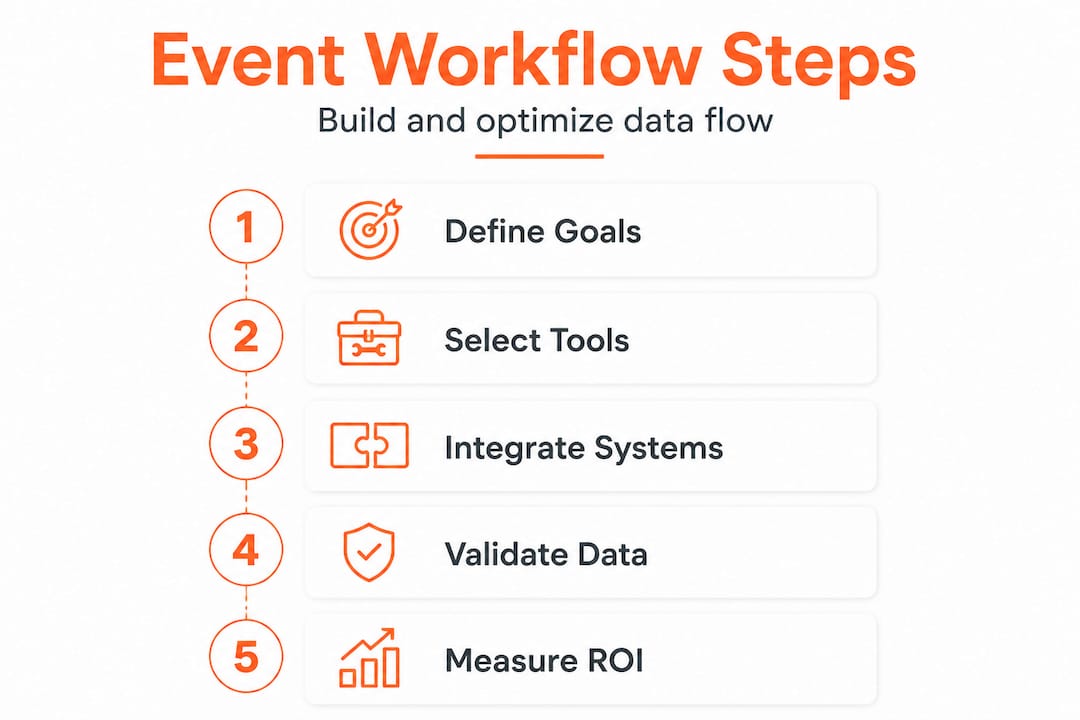
Step 1: Define your data objectives
Start by answering: What business questions does this event need to answer? For example, are you trying to identify net-new pipeline? Accelerate accounts already in late-stage deals? Retain at-risk customers? Your objectives determine what data you need to collect and what you do not.
Step 2: Map every data touchpoint
List every moment during the event where a prospect or customer interacts with your brand. Include:
- Registration page
- Confirmation and reminder emails (click data)
- Check-in and badge scan
- Session attendance and duration
- Booth visits or one-on-one meeting requests
- Content downloads or demo requests on-site
- Post-event survey responses
- Follow-up email engagement
Step 3: Integrate your tools
Connect your event platform to your CRM and marketing automation system using native integrations or an API layer. Map every data field explicitly. Do not rely on assumptions about how platforms communicate.

Step 4: Establish data validation rules
Set up validation at the point of capture. This includes required fields, format rules (such as business email only), and deduplication logic in your CRM. Dirty data at intake multiplies into expensive problems downstream.
Step 5: Assign workflow owners
Every step in your workflow should have a named owner. Who confirms integrations are live? Who monitors data quality during the event? Who triggers the post-event follow-up sequence? Ownership gaps are where data goes to die.
Manual vs. automated workflow comparison
| Factor | Manual workflow | Automated workflow |
|---|---|---|
| Data entry speed | Slow, batch-based | Real-time sync |
| Error rate | High (human input) | Low (validated at source) |
| Scalability | Limited by headcount | Scales with volume |
| Follow-up speed | Days to weeks | Minutes to hours |
| Reporting accuracy | Inconsistent | Consistent and auditable |
To boost B2B event ROI, automation is not optional at scale. Manual processes create bottlenecks that slow down sales follow-up, which is exactly when buyer intent is highest. Actionable event insights only emerge when your data arrives clean and on time.
Pro Tip: Segmentation tips improve event ROI, and the best time to build segmentation logic is before your event launches. Define your segments (by role, account size, engagement level, or buying stage) during the workflow-build phase so your data is tagged and ready for action the moment the event ends.
Troubleshooting and validation: Avoiding common pitfalls
Even well-designed workflows fail without ongoing validation. Here are the most common issues event teams face and how to address them before they cost you pipeline.
⚠️ Common mistakes to avoid
- Missing integrations: Your event platform collects data that never syncs to your CRM because a field was skipped during setup.
- Poor segmentation: All attendees are treated as one audience, making post-event outreach generic and low-converting.
- Single-point failures: If one tool in your workflow goes down, there is no backup or manual fallback to keep data flowing.
- Delayed follow-up triggers: Automation sequences are not activated in time, and leads go cold while your team waits for data to appear.
- Unvalidated forms: Registration forms accept personal email addresses or incomplete records, creating messy CRM data.
Validation steps by stage
Before the event: Run integration tests, confirm field mappings, review deduplication rules, and audit consent language.
During the event: Monitor real-time data flow. Spot-check five to ten records per hour for accuracy. Confirm automation sequences are triggering correctly.
After the event: Cross-check total registrations against CRM records. Validate engagement scores against session attendance logs. Confirm all follow-up sequences launched.
"Data validation is not a one-time event. It is a continuous discipline that separates event teams who generate pipeline from those who generate reports."
67% of marketers report better ROI when they actively track event data throughout the event lifecycle. That statistic reflects a clear behavioral difference: teams that validate consistently outperform teams that check in only after the fact. Understanding why event metrics matter helps you build a culture of real-time accountability, not post-event regret.
Pro Tip: Cross-check your registration data against engagement data on a weekly basis during multi-day or multi-week event programs. Discrepancies in those two datasets usually signal a broken integration or a misconfigured trigger that needs immediate attention.
Evaluating results: How to measure event impact and revenue gains
Your workflow is live, your data is clean, and your event is done. Now comes the part that actually justifies your budget: connecting event activity to revenue outcomes.
📊 Key metrics to connect workflow data to business results
- Pipeline generated: Total value of new opportunities created as a direct result of event interactions.
- Pipeline influenced: Deals already in progress that accelerated after event engagement.
- Engagement rate by segment: Which attendee segments interacted most and at what depth?
- Conversion rate from attendee to opportunity: What percentage of attendees became sales-qualified leads?
- Time to follow-up: How quickly did your sales team act on event-generated leads?
- Revenue closed from event-sourced leads: The ultimate measure of event ROI.
Event engagement metrics are key for B2B success, and tracking them inside your existing CRM and revenue platform is what makes your event program credible to finance and leadership. When you can show a line between a booth scan and a closed deal, events stop being a cost center and become a growth channel.
📈 Statistical benchmarks for B2B event outcomes
Use these as reference points when evaluating your own results:
- Top-performing B2B event programs convert 20 to 30% of qualified attendees into pipeline opportunities.
- Events with real-time data sync and automated follow-up sequences see lead response times drop from days to under four hours.
- Teams that measure event performance consistently across programs report 15 to 25% improvement in per-event ROI year over year.
Continuous improvement steps
- Conduct a post-event data audit within 72 hours of the event closing.
- Run a pipeline review with sales within one week to validate lead quality.
- Score each workflow component (registration, check-in, follow-up) and identify your lowest-performing step.
- Document changes before planning your next event so improvements compound.
What most event managers overlook about data workflows 💡
Here is a perspective that most articles on this topic will not share: the problem is rarely a lack of data. Most B2B event teams are collecting more data than ever. The real problem is that they treat workflow design as a setup task rather than a strategic discipline.
Conventional wisdom says more data equals better insights. But in practice, teams drowning in unvalidated, poorly segmented, or disconnected data make worse decisions than teams with fewer but higher-quality signals. Volume without structure is noise.
The event managers who consistently generate the most pipeline from their events are not the ones using the most tools. They are the ones who revisit their workflows after every single event, not just during annual planning. They ask: which touchpoints generated the highest-quality data? Which integrations created friction? Where did follow-up slow down?
This kind of post-event workflow retrospective is where real competitive advantage is built. A team that refines its workflow four times a year will dramatically outpace one that rebuilds from scratch each January. The gains are not linear; they compound.
We have seen real-world cases where teams switched from high-volume, low-structure data approaches to leaner, more intentional workflows and immediately saw follow-up speed improve, lead quality scores increase, and sales team satisfaction rise. The event marketing checklist is a great starting point, but your best workflow will always be shaped by what your specific data is telling you after each event.
The takeaway: treat your workflow as a living system. Review it, improve it, and evolve it with every program you run. That is where the real ROI lives.
Take your event data workflow to the next level 🚀
You now have the framework to build, validate, and measure an event data collection workflow that drives real business outcomes. The strategies in this guide are proven, but putting them into practice consistently is where most teams need support.
Sandbox is built specifically for B2B teams that want to turn event activity into measurable pipeline and revenue. Our platform connects your event marketing strategy with hands-on execution workflows so nothing slips through the cracks. Whether you are optimizing a single flagship conference or scaling a full event program, we give you the systems and signal to make every event accountable. Explore how to boost ROI with event workflows and see what a purpose-built GTM approach can do for your next event.
Frequently asked questions
What is the best platform for event data collection?
The best platforms integrate CRM and analytics tools to automate data capture and enable real-time insights for B2B events. Marketing automation increases workflow efficiency by removing manual handoffs and ensuring data reaches your revenue systems without delay.
How often should workflows be validated?
Event data workflows should be validated before, during, and after each event to maintain data integrity and maximize ROI. 67% of marketers report better ROI when they track event data consistently across the full event lifecycle.
What are the most important metrics to track?
The most important metrics for B2B event data workflows include engagement rates, conversion rates, and pipeline growth. Event engagement metrics are key to connecting event activity to revenue and justifying your event investment to leadership.
How can data segmentation boost event ROI?
Data segmentation enables targeted post-event engagement, resulting in higher pipeline growth and increased ROI. Segmentation tips improve event ROI by ensuring your follow-up outreach reaches the right accounts with the right message at the right moment.